

Fintech & Banking Technology
How Digital Wallets (Apple Pay, Google Pay) Actually Work
Sep
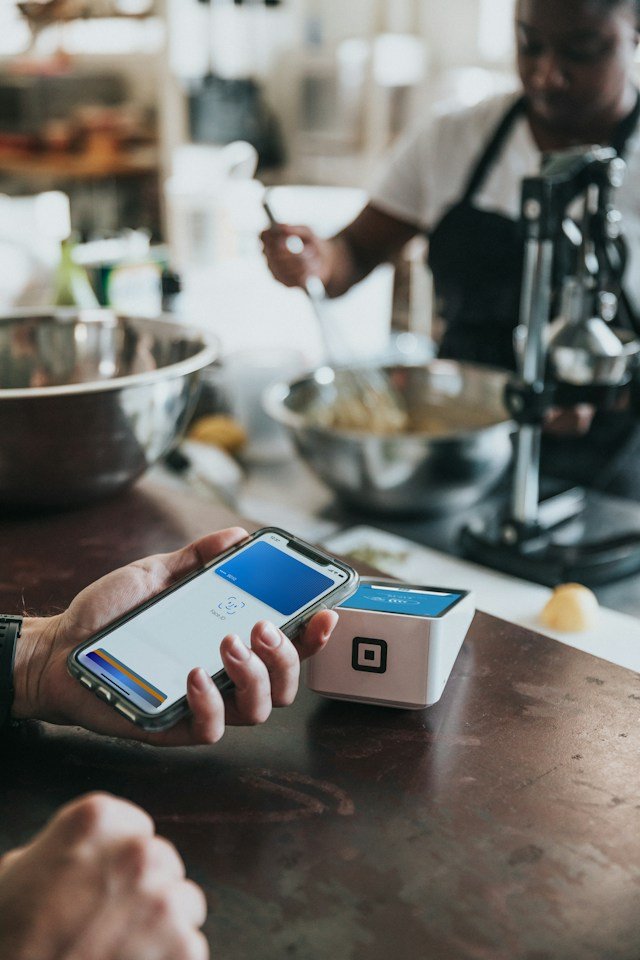
You tap your phone against a payment terminal, feel a small vibration, see a checkmark, and walk away with your coffee. The entire interaction takes less than a second, and most people have used it hundreds of times without ever wondering what actually happened in that moment. Digital wallets like Apple Pay and Google Pay have quietly replaced the physical card swipe for millions of everyday purchases, but the technology powering that single tap is genuinely more sophisticated than it looks. This article breaks down exactly how digital wallets work, from the moment you add a card to the moment a payment terminal accepts your tap.
What a Digital Wallet Actually Is
A digital wallet is an app, typically built directly into a smartphone or smartwatch, that securely stores a digital representation of your payment cards, allowing you to make purchases by tapping your device at a compatible terminal instead of physically presenting a card. Apple Pay and Google Pay are the two most widely used examples in the U.S. market, though the underlying technology and security principles are broadly similar across most major digital wallet platforms.
Importantly, a digital wallet doesn’t actually store your real card number anywhere on your device. Instead, it relies on a security technology called tokenization to represent your card with a device-specific substitute value, which is a critical part of why digital wallets are generally considered more secure than a physical card.
A Brief History of Tap-to-Pay Technology
Contactless payment technology actually predates smartphone-based digital wallets by more than a decade, with early contactless cards appearing in limited markets in the early 2000s. Apple Pay’s 2014 launch marked a significant turning point, combining existing NFC and tokenization technology with smartphone biometric authentication for the first time at real mainstream scale, quickly followed by Google’s competing platform. Since then, adoption has accelerated considerably, particularly as more payment terminals across the U.S. have been upgraded to support contactless transactions, and as consumer comfort with tap-to-pay technology has grown substantially.
How Adding a Card to Your Digital Wallet Works
Step 1: Card Details Are Submitted
When you add a card to your digital wallet, you either manually enter the card number or use your phone’s camera to scan it. This information is transmitted securely to your card’s issuing bank for verification.
Step 2: Your Bank Verifies and Approves
Your bank checks that the card is valid and confirms your identity, sometimes through an additional verification step like a text message code or a prompt within your existing banking app, specifically to confirm that you, the legitimate cardholder, are the one adding the card.
Step 3: A Device-Specific Token Is Generated
Once verified, a token service provider — typically the card network itself, such as Visa or Mastercard — generates a unique token specifically tied to your card and your specific device. This token, not your actual card number, is what gets stored on your phone going forward.
| Step | What Happens |
|---|---|
| 1. Add card | Card details are entered or scanned and sent securely for verification |
| 2. Bank verification | Your bank confirms the card is valid and verifies your identity |
| 3. Token generation | A device-specific token is created to represent your card |
| 4. Secure storage | The token is stored in a protected hardware area on your device |
Where Your Card Token Actually Lives on Your Phone
Digital wallet tokens aren’t stored in regular app storage the way a photo or a text message would be. Instead, they’re kept in a dedicated, hardware-isolated security chip built into modern smartphones, often called a secure element. This chip is specifically designed to be extremely difficult to access from outside its intended, narrow purpose, meaning even if malicious software somehow compromised other parts of your phone, the payment tokens stored in this isolated hardware would remain protected.
What Happens When You Tap to Pay
The actual payment moment relies on a wireless communication technology called Near Field Communication, or NFC, which allows two devices to exchange a small amount of data when held very close together, typically within just a few centimeters.
Step 1: The Terminal Detects Your Device
When you hold your phone near a compatible payment terminal, the NFC chips in both devices establish a brief, secure connection.
Step 2: Biometric or PIN Verification
Before the payment token is actually transmitted, your device typically requires you to authenticate — through a fingerprint scan, facial recognition, or a device passcode — confirming that you, specifically, are the one initiating this particular payment.
Step 3: The Token Is Transmitted
Once authenticated, your device sends the stored token, along with a dynamically generated one-time security code specific to that exact transaction, to the payment terminal.
Step 4: The Transaction Processes Normally
From this point forward, the transaction flows through the same underlying payment infrastructure as any card payment — the token gets routed through the payment network, mapped back to your real card details at the appropriate secure step, and authorized by your bank, typically within a second or two.
A Practical Example: Imagine tapping your phone to pay for a $12 lunch order. In that instant, your phone verifies your fingerprint, confirms you’re the legitimate device owner, then transmits your device-specific token along with a unique one-time code generated specifically for this single transaction to the restaurant’s payment terminal. Even if someone were somehow able to intercept this exact transmission, the one-time code would be useless for any future transaction, and the token itself would only work when paired with your specific device and biometric authentication — meaning stolen data from this single tap provides essentially no path to fraudulently charging your card again.
Why Digital Wallets Are Generally More Secure Than Physical Cards
“A stolen physical card exposes a reusable number. A stolen digital wallet transaction exposes a one-time code tied to a device that isn’t yours. That distinction is the entire security advantage of tap-to-pay technology in a single sentence.”
- Your real card number is never transmitted during a digital wallet purchase, unlike swiping or inserting a physical card.
- Each transaction uses a unique, one-time code, meaning intercepted transaction data can’t be reused for a future purchase.
- Biometric or passcode verification is required for each payment, adding a layer of protection a physical card simply doesn’t have.
- Tokens are device-specific, so a token stolen from one device generally can’t be used on another device or in a different context.
How Digital Wallets Handle Watch and Wearable Payments
Smartwatches capable of tap-to-pay purchases generally follow the same underlying tokenization and NFC process as a smartphone, with one notable difference in how authentication works. Since many smartwatches don’t have a fingerprint sensor, they typically rely on requiring the watch to remain unlocked and worn continuously since the last passcode entry, using built-in motion sensors to detect if the watch has been removed, at which point it automatically re-locks and requires re-authentication before another payment can be made.
What Happens If You Lose Your Phone
Because digital wallet payments require device-level authentication, a lost or stolen phone doesn’t automatically grant a thief the ability to make purchases, particularly if your device has a passcode or biometric lock enabled. Additionally, most digital wallet platforms allow you to remotely suspend or remove stored cards through your device manufacturer’s account management tools, similar to how you might remotely lock a lost phone entirely.
Online and In-App Digital Wallet Payments
Beyond in-person tap-to-pay purchases, digital wallets are also widely used for online checkout and in-app purchases, allowing users to complete a transaction with a single tap rather than manually entering card details on every website or app. This works through a similar tokenization process, with the website or app receiving a token rather than your actual card number, and your device handling the biometric or passcode confirmation before the payment is authorized.
| Payment Context | How Authentication Happens |
|---|---|
| In-person tap-to-pay | NFC communication plus on-device biometric or passcode confirmation |
| Online checkout | Digital wallet button triggers biometric confirmation directly within the browser or app |
| In-app purchases | Similar to online checkout, often integrated directly into the app’s payment flow |
How Digital Wallets Handle Multiple Cards
Most digital wallet apps allow users to store multiple cards — a primary debit card, a couple of credit cards, sometimes even transit or loyalty cards — and select which one to use as the default or choose a different card at the moment of payment. Each stored card generates its own separate, independent token, meaning the wallet is really managing several distinct tokenized payment methods simultaneously, rather than a single unified account.
Digital Wallets vs Traditional Contactless Cards
It’s worth briefly comparing digital wallets to contactless-enabled physical cards, which also use NFC technology for tap-to-pay purchases. While both rely on similar wireless communication technology, a standard contactless card generally doesn’t require biometric or passcode verification at the point of sale, meaning a lost contactless card carries somewhat higher fraud risk compared to a digital wallet, which layers device-level authentication on top of the same underlying NFC technology.
Common Misunderstandings About Digital Wallets
- “My actual card number is stored on my phone.” In reality, only a device-specific token is stored, with your real card number kept securely by the token service provider, not your device.
- “Digital wallets require an internet connection to work.” NFC-based tap-to-pay transactions typically work through the local wireless connection between your device and the terminal, functioning even without an active internet or cellular connection at the moment of payment.
- “Anyone could use my phone to pay if they picked it up.” Since most transactions require biometric or passcode confirmation, simply possessing your phone typically isn’t enough to complete a payment.
- “Digital wallet apps can see my full spending history across every card.” While a digital wallet app may show recent transaction activity for cards added to it, it doesn’t automatically gain broad access to your full banking history beyond what’s needed to facilitate payments.
How Merchants Benefit From Digital Wallet Adoption
For merchants, accepting digital wallet payments generally offers faster checkout times compared to inserting a chip card, along with the same tokenization-based fraud protection benefits discussed throughout this article. This combination of speed and security is a major reason digital wallet acceptance has become increasingly standard across U.S. retail locations, restaurants, and transit systems in recent years.
The Future of Digital Wallet Technology
As digital wallets continue expanding beyond simple card storage, many platforms are increasingly incorporating additional functionality like storing digital identification, event tickets, and loyalty program details alongside payment cards, moving toward a more comprehensive digital replacement for a traditional physical wallet. At the same time, continued advancements in biometric authentication technology are likely to keep making the verification step at the moment of payment both faster and more secure over time.
When Professional Guidance Might Help
- If you’ve experienced unauthorized activity connected to a digital wallet and need help understanding your bank’s dispute process
- If you’re a business owner evaluating whether to invest in digital wallet-compatible payment terminals
- If you have specific privacy questions about how a particular digital wallet platform handles your transaction data
Frequently Asked Questions (FAQ)
Is it safer to use a digital wallet than a physical credit card?
Generally, yes. Digital wallets use tokenization and require device-level authentication for each transaction, meaning stolen transaction data is typically far less useful to a fraudster compared to a stolen physical card number.
Do digital wallets work without an internet connection?
For in-person NFC tap-to-pay purchases, yes — the transaction relies on the local wireless connection between your device and the payment terminal, though the underlying transaction still needs network connectivity somewhere in the broader payment chain to ultimately authorize with your bank.
Can someone use my digital wallet if they steal my phone?
It’s significantly harder than with a physical card, since most digital wallet transactions require biometric verification or a device passcode, though it’s still important to have strong device security enabled and to report a lost phone promptly to suspend stored cards.
Why do some stores not accept digital wallet payments?
Accepting tap-to-pay transactions requires NFC-compatible payment terminal hardware, and some smaller or older point-of-sale systems haven’t yet upgraded to support this technology, though adoption has grown significantly across most major U.S. retailers in recent years.
Does using a digital wallet cost extra compared to using a physical card?
No, there’s typically no additional cost to the consumer for using a digital wallet instead of a physical card — the underlying transaction fees are generally handled the same way regardless of which payment method is used.
Can I use a digital wallet with a debit card, not just a credit card?
Yes. Most digital wallets support both debit and credit cards from participating banks, using the same tokenization and authentication process regardless of which card type is stored.
Conclusion
Digital wallets have turned a single tap into a genuinely sophisticated security process, combining tokenization, device-specific authentication, and one-time transaction codes to make everyday payments both faster and more secure than swiping a physical card. Understanding what’s actually happening in that split-second tap — from the hardware-isolated secure element storing your token to the biometric check confirming it’s really you — helps explain why this technology has become such a trusted, widely adopted part of how Americans pay for things every single day.